One engine, from course material to checked work.
Peridot is five parts that work as one: the engine that writes labs, each student’s own computer in the cloud, the tests that check the work, the tutor that helps, and the live view that shows staff what is happening.
From your course to hands-on labs.
The engine reads your material the way a good lab designer would: what does this chapter want a student to be able to do, and what would prove they can? Then it builds the computer, the steps and the checks.
- 01
Upload your course
A syllabus, a book, slides or lab sheets. Whatever you teach from.
- 02
Peridot drafts labs and tests
Every chapter gets hands-on steps, a test and the right computer.
- 03
Your lecturer reviews and publishes
Try each lab, ask for changes, then release it to the class.
- 04
Students work on a computer in the cloud
A live environment for the course, ready in seconds, opened from any laptop.
- 05
Results and evidence come back
To your staff, and to your systems if you connect them.
Understands each step
It works out what every step needs: something to read, something to watch, something to do, or something to prove.
Chooses the right tool
A terminal or a spreadsheet, a figure or a form. Each step gets the tool it needs.
Sets up the computer
Users, files, logs, a company ledger, a SIEM with alerts. Each computer starts ready for the lab.
Writes the guide
Plain steps, predictions, questions, and hints that get more specific each time a student is stuck.
Writes the checks
Every step that can be checked on the computer is. No two students get the same paper.
Staff approve it
Nothing reaches students until a member of staff has tried it. Edits go back into the course.
A computer in the cloud, for every subject.
Every student gets their own Ubuntu, Windows or Mac computer in the cloud, ready in seconds, with the apps each subject needs: a terminal, spreadsheets, accounting, documents, code and a web browser.
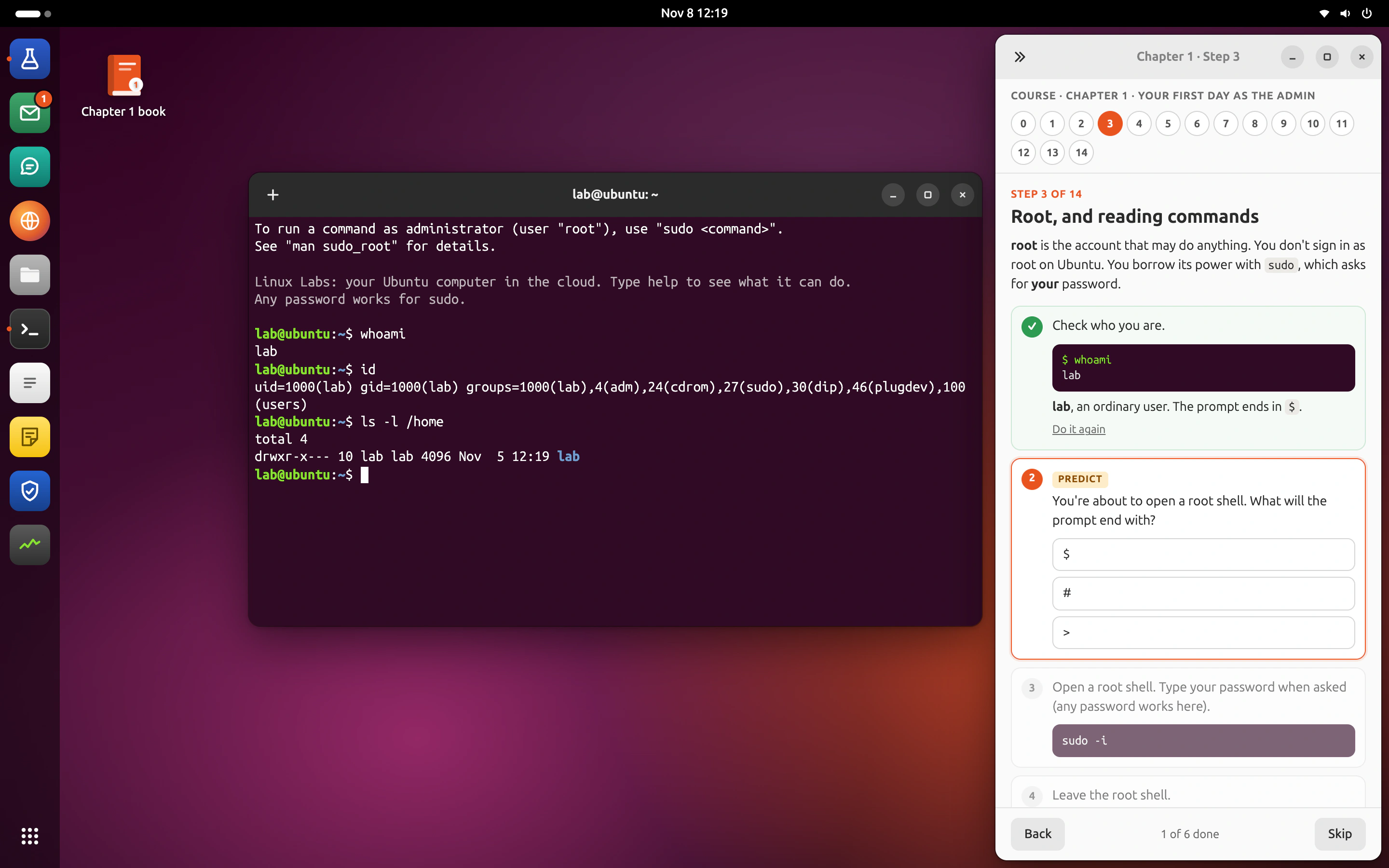
Ubuntu, for IT, security and code.
A full Ubuntu computer with a real command line, a training SIEM and a code editor. Students run commands, read logs and break things safely; a reset takes one click.
- Apps
- TerminalFilesCodeSIEMMailBrowser
- Courses
- Linux administrationSOC analystDevOpsSecure AI
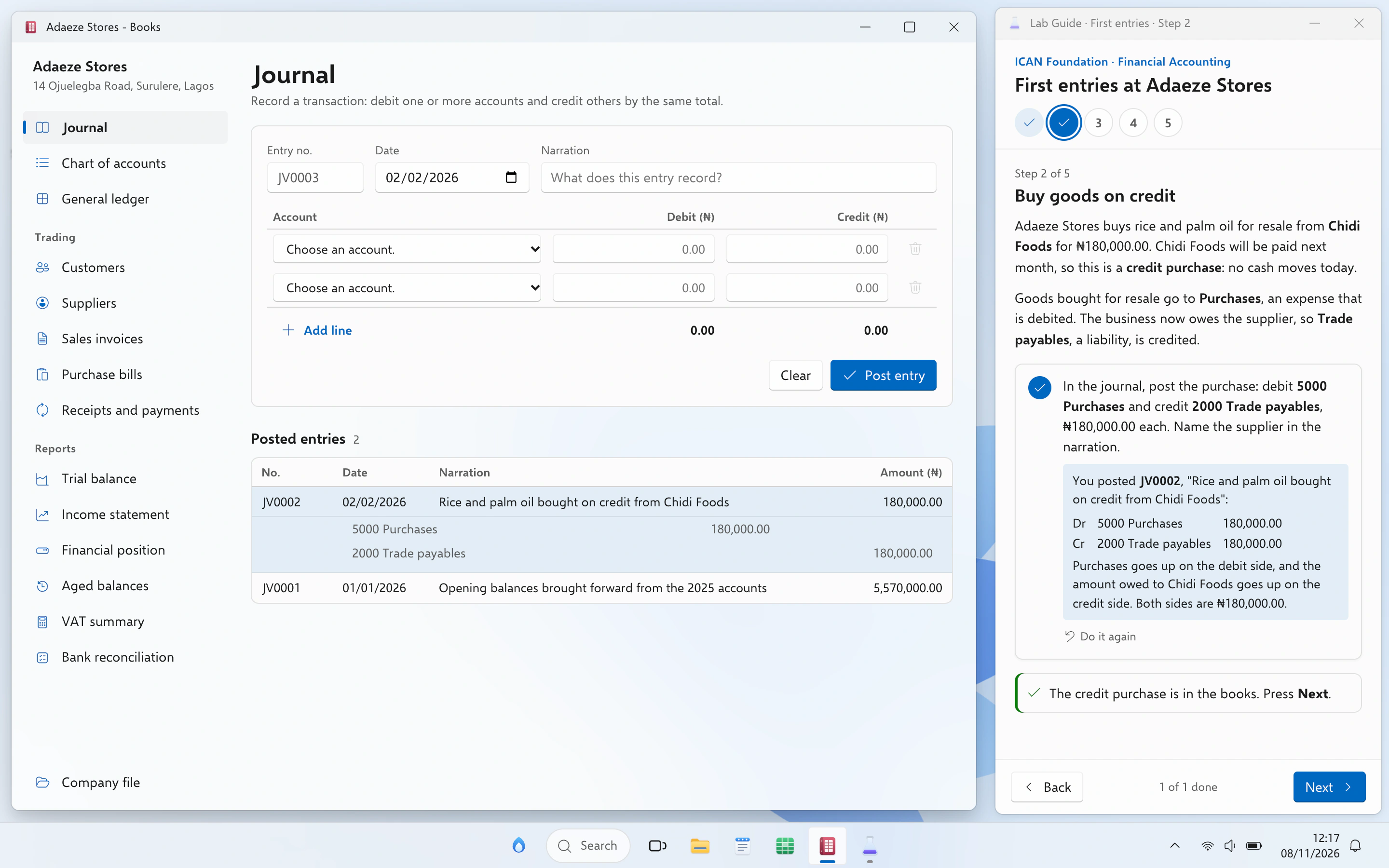
Windows, for accounting and the office.
The computer most offices run. The company file waits in Documents, the books open in Books, and the guide checks every entry against the ledger.
- Apps
- BooksSheetsWriteFile ExplorerPDF reader
- Courses
- ICAN FoundationICAN SkillsICAN ProfessionalAI for your profession
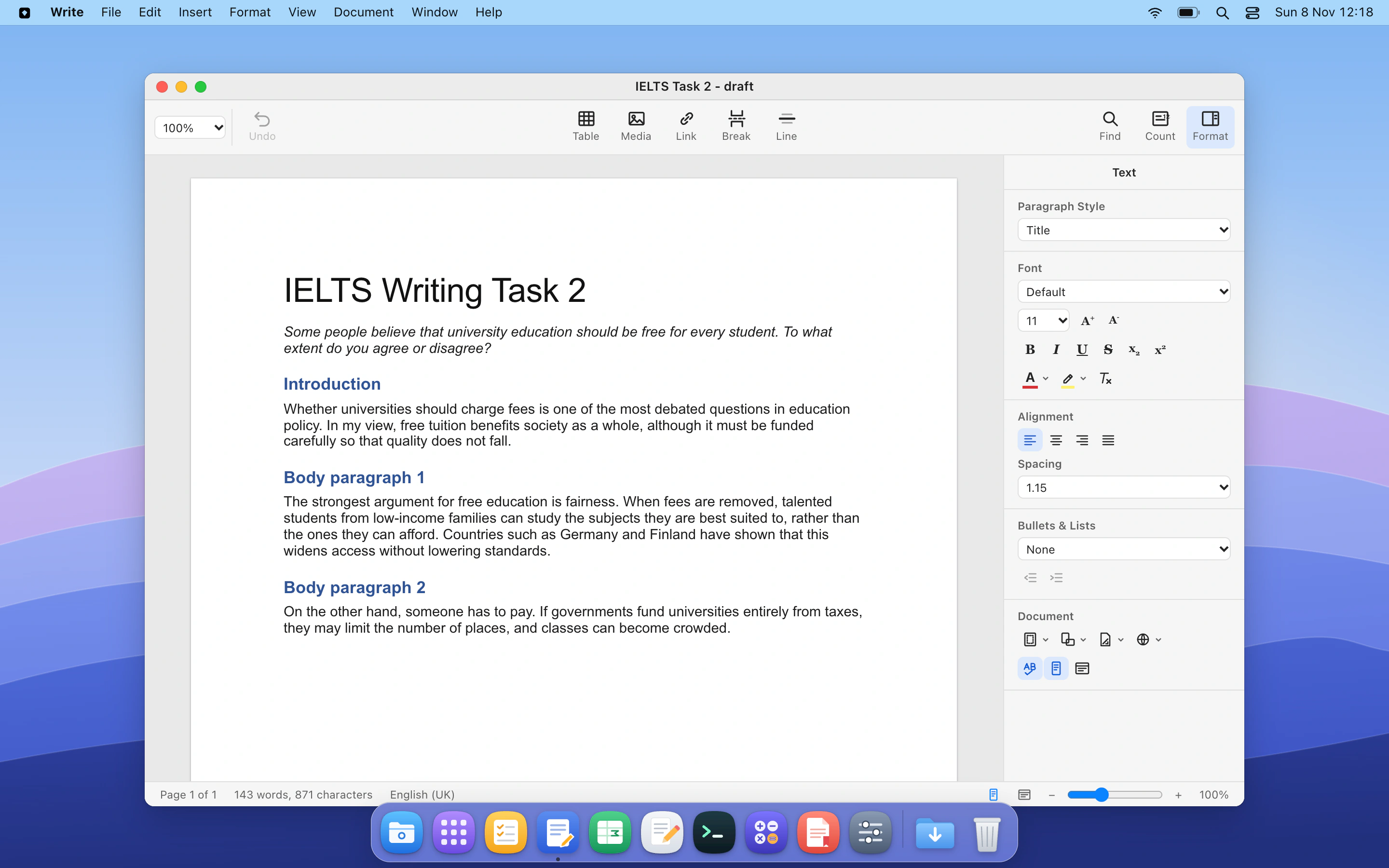
Mac, for writing, data and admissions.
A calm Mac computer for essays, reports and data questions. Students draft in Write and work real tables in Sheets, the way they will at university.
- Apps
- WriteSheetsNotesBrowserPDF reader
- Courses
- IELTSGMATLead AI productsCreate with AI
Terminal
A Linux command line with a full filesystem, users, processes, services and logs.
Files
A file manager over the same filesystem the terminal sees.
Sheets
A spreadsheet with formulas, formatting and the naira sign where it belongs.
Write
A word processor for reports, memos, essays and work papers.
Code
A code editor with a file tree, wired to the terminal.
Books
Bookkeeping: journal, ledger, trial balance and statements.
Browser
A browser for the lab's own sites: a SIEM, a shop, a portal.
PDF reader
Case files, statements and exam papers, opened like the real thing.
Scales with the class
A class of 40 or 4,000 gets the same experience, with nothing for your IT team to run.
Safe by design
Every student has their own computer in the cloud, separate from their laptop. They can run anything, break anything, and a reset takes one click.
Works on any laptop
Nothing to install. Ready in seconds, on campus Wi-Fi or at home.
Checks that read the work.
A check reads the work itself: this user exists and is in that group; this entry debits Purchases and credits Trade payables; this alert is marked a true positive with the right reason.
- Computer checks for commands, files, services and logs.
- Document checks for ledgers, spreadsheets and written answers.
- Question pools so every student gets different values.
- Evidence stored with every mark.
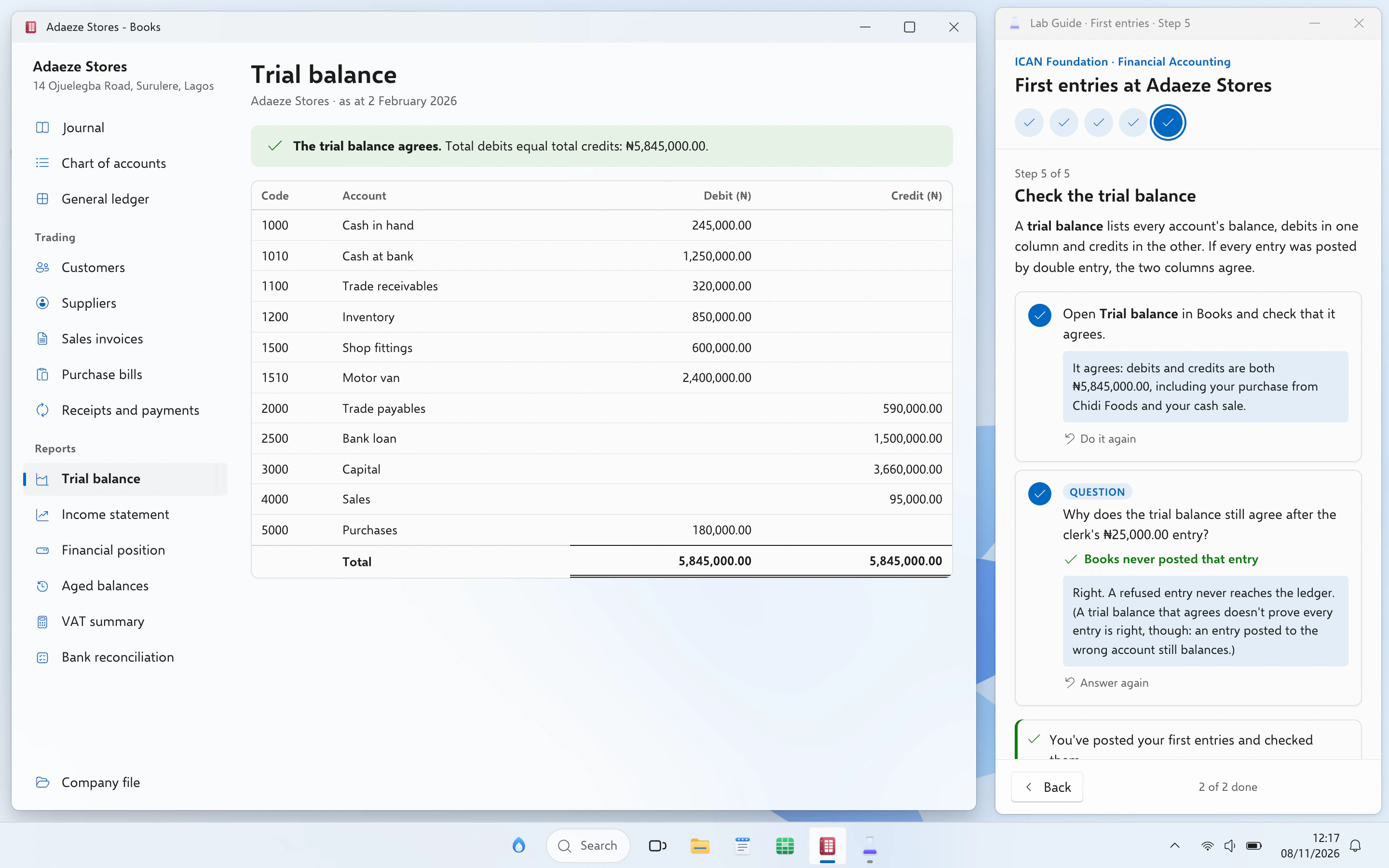
- 01
Student does the task
Adds the user, posts the entry, writes the verdict.
- 02
Peridot checks the real result
The user that exists, the ledger, the saved document.
- 03
Instant feedback with a hint
Right first time, or a nudge that gets closer on each try.
- 04
Evidence kept for moderation
Every mark can be explained to an examiner or an appeal.
Hints that get closer, never the answer.
The tutor knows the step, what the student has done and their last attempts. It answers questions about the subject freely and nudges on the task, but it will not do the task.
- Socratic by default: it asks before it tells.
- Escalating hints, each one more specific than the last.
- Course book aware: it points to the page that explains it.
- Personal data stays private: names, emails and student IDs stay with Peridot.
- Your organisation sets AI limits, and can switch the tutor off per course.
useradd. What do you see if you search that log for it?Know who needs help today, not after the exam.
Progress arrives as checks run. Lecturers see the class; TAs see their groups; heads of department see courses side by side.
- Stuck alerts when a student has been on one step too long.
- Grouped mistakes across the class.
- Exports to a spreadsheet or your warehouse.
usermod -G without -a, which replaces their groups.Insight- 01
Org admin
Every faculty, department and course.
- 02
Unit admin
Their faculty or department.
- 03
Lecturer
Their courses and classes.
- 04
TA
The groups they help.
- 05
Student
Their own work and results.
What is live, in progress and coming.
| Capability | Notes | Status |
|---|---|---|
| Ubuntu computer, Terminal, Files | Linux administration and SOC labs | Live |
| Linux administration labs | Chapters with checked steps and tests | Live |
| SOC analyst labs | Training SIEM, alerts, attack path | Live |
| Windows computer, Books, Sheets | Used by the ICAN Foundation labs | In progress |
| Mac computer | Same apps as Ubuntu and Windows | In progress |
| Docker and Kubernetes labs | For the DevOps course | In progress |
| AI tutor | Hints, never the answer; AI limits set by your organisation | In progress |
| Engine drafts a course from your material | Staff review before release | In progress |
| Organisations, units and roles | Admin app for universities and companies | In progress |
| Results API and webhooks | Shared with pilot partners | In progress |
| SSO with SAML, SCIM provisioning | Your identity provider | Coming |
| LTI 1.3 links into your LMS | Moodle, Canvas, Blackboard and others | Coming |
| Choice of data region | See security page for our stance | Planned |
Send us one course. Get labs back.
Pilot Peridot with one course for one term. We build the labs with your staff, and you see every result.